
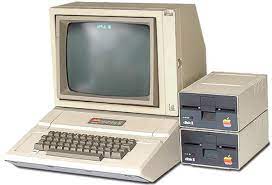
My first PC looked a lot like this (minus one of the floppy drive bays and adding a monitor).
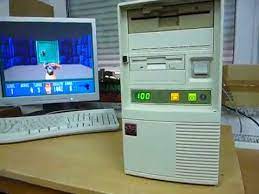
Every other PC I owned, after the one above, ran Windows. My next PC looked like this. It was a Pentium 486 that ran Windows 95.
My current PCs are much smaller and much more powerful. They’ve all typically ran Windows up until recently. I’ve been trying to learn Linux, so I decided to try out Kali Linux. Here’s what I’ve learned so far.

Power
The Windows framework uses a GUI that is intuitive and helpful for the entry-level individual. It’s designed to be so that it’s used by the masses. Fundamentally, it’s easy. Linux on the other hand seems to have been designed by people who want to accomplish a lot with less effort. It’s design centers around the terminal (for Windows users, think command prompt) which requires knowing how to tell the PC what to do. But once you know how, it’s much more powerful. This weekend I started trying to figure out my first box on HackTheBox. It forced me to learn how to use OpenVPN via the terminal rather than a gui, Nmap, and few other tidbits I hadn’t known before. It was both frustrating to not know how to tell Linux what to do (Google, walkthroughs, etc. help) and then incredible how little effort it took to get it to do some pretty powerful things once I learned the command.
Security
After learning how to use Nmap, I started playing with it on my own home network. The machines running Linux (I have a son learning Linux now), compared to the Windows machines had less ports open. Now I know this isn’t the only factor to security, but Linux typically has a reputation for being more secure so I am relying on contextual (perhaps anecdotal) information for this piece but if you can give a few commands to lock your firewall down, close ports etc., vs having to navigate to the programs and opening each setting on a GUI (graphical user interface) and adjusting them, you save time and energy. And that means you’re more likely to be secure.
Concerned about security? Check out a few OS’s I’ve come across recently. There’s Tails, which is a portable OS that leaves no trace on the host machine after usage. Then there’s Qubes OS which is a more permanent OS that segments almost all the various elements of the platform so they’re isolated from all the other systems.
Usage
Microsoft has the advantage here. With more people being able to navigate Windows easier and wider base of software (and games) being available on a Windows platform, Windows wins this category. But with all of the news lately about Microsoft’s platforms being attacked in one way or another (PrintNightmare, SeriousSAM, Exchange Server attacks), perhaps we’ll start to see people using more secure systems. Yes, Linux has it’s own vulnerabilities, but if they’re just as common (if not more), then they’re not broadcast as much.
So, Linux wins in my opinion, though I will not get rid of Windows any time soon. Are you familiar with Tails or Qubes? I’ve not used either so I’d be interested in hearing your take on them. How do they compare to Linux or Windows? Let me know!
 Truth & Tech
Leave a comment